
Hello all,
Today we going to see how to limit the bandwidth usage of cPanel account in WHM
First thing every Hosting account that you created in WHM for your customers comes along with an allotted Bandwidth.
Since different types of content require different bandwidth quota, you can set the limit as per specific usage requirements. From within your WHM, you can get it done easily.
An another important thing that WHM already allots a bandwidth limit for each cPanel Account you create. When the set bandwidth limit for an account exceeds, the account stops working. To have it functioning again, you either have to reset the limit or increase it.
Steps to Limit the bandwidth usage
Step 1 : Log in to your WHM panel
Step 2 : Search Limit Bandwidth in top left search bar
Step 3 : Choose Limit bandwidth option
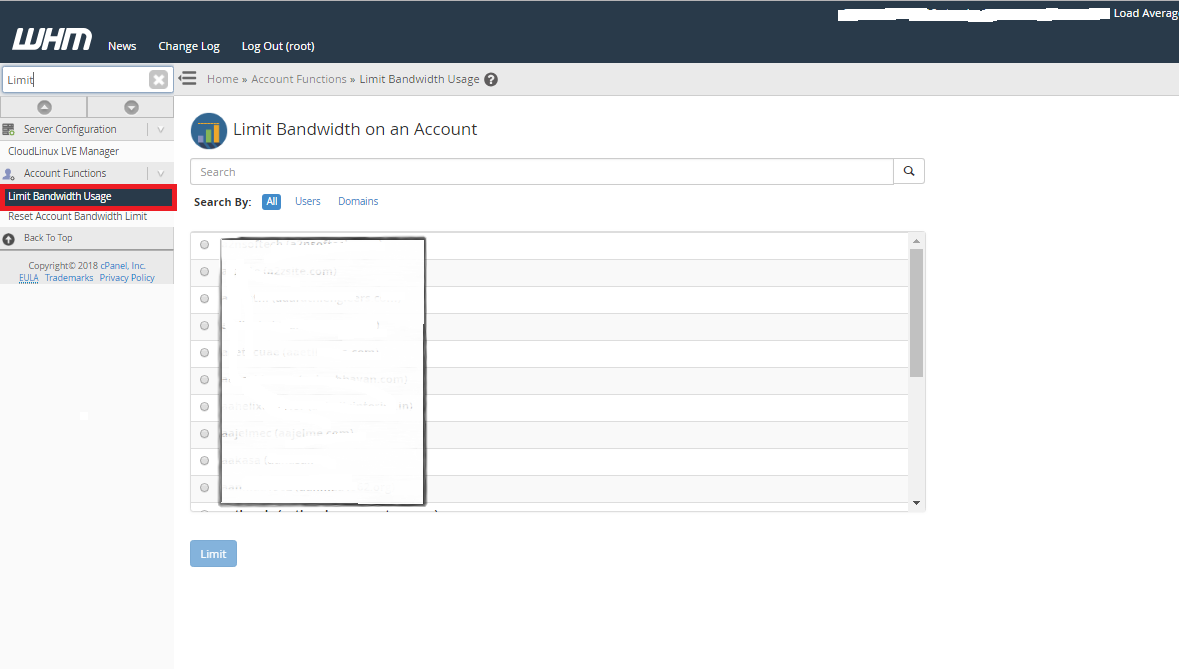
Steps 4 : Then Select an account which you want to limit the bandwidth usage
Step 5 : Click the Limit button.
Step 6 : Reset or increase the bandwidth limit as required, Then click change button to save the information
Now the bandwidth limit has been set to the chosen cPanel accounts in WHM.