

In the realm of email protocols, two titans have long stood their ground: IMAP and POP3. For many users, these terms might seem like technical jargon floating in the vast sea of cyberspace. However, understanding the nuances between IMAP and POP3 is crucial for managing your email efficiently and securely. In this comprehensive guide, we will delve into the differences between these protocols, their respective advantages and disadvantages, and help you make informed choices tailored to your email needs.
What Are IMAP and POP3
Before diving into the intricacies of IMAP and POP3, let’s establish a basic understanding of what they are and how they function.
IMAP (Internet Message Access Protocol)
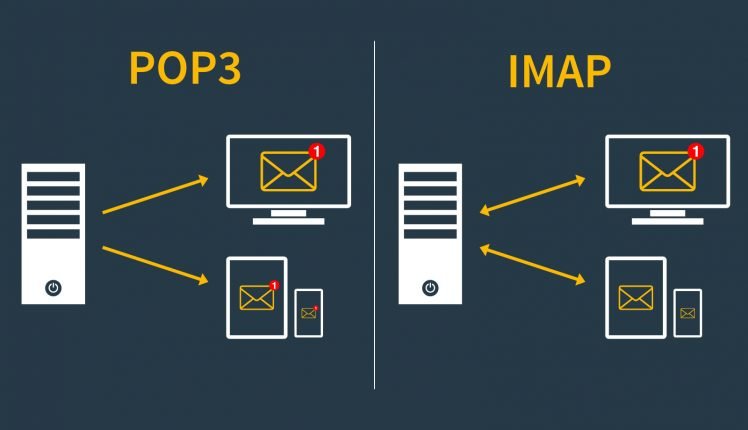
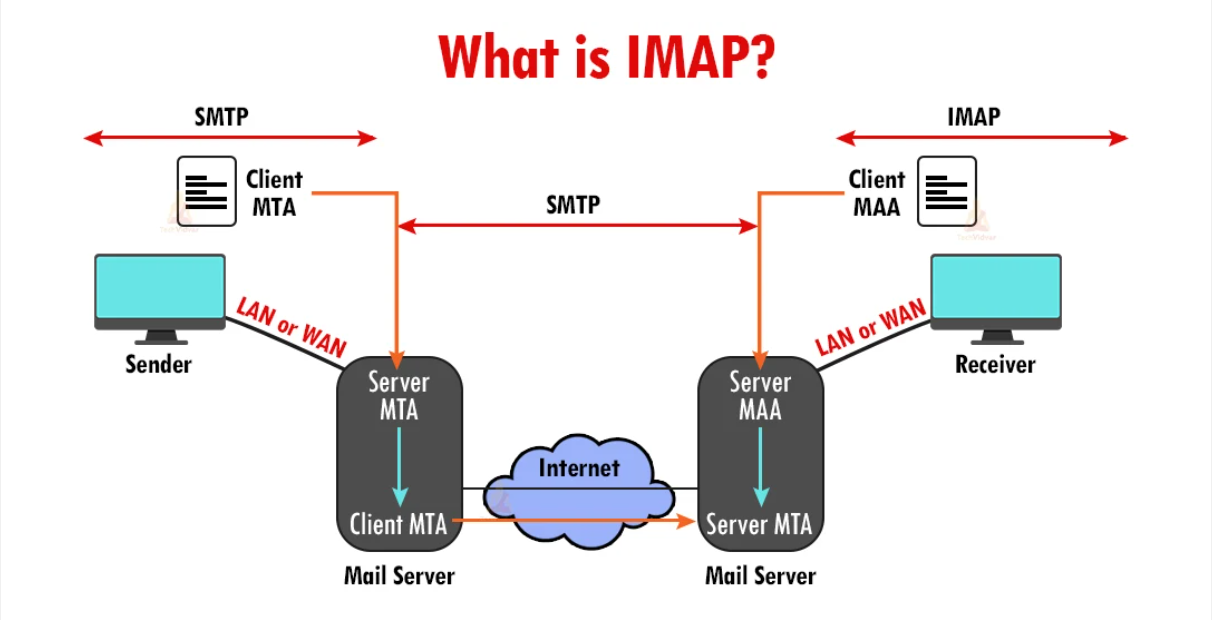
IMAP is a modern email protocol designed for managing emails on a mail server. When you use IMAP, your email client (such as Outlook, Thunderbird, or Apple Mail) synchronizes with the server, allowing you to access your emails from multiple devices. IMAP retains emails on the server, offering a consistent view of your mailbox across all devices. It supports features like folder management, server-side searching, and synchronization of read/unread statuses.
POP3 (Post Office Protocol version 3)
On the other hand, POP3 is an older email protocol that works by downloading emails from the mail server to your local device. Unlike IMAP, POP3 typically downloads emails to a single device and removes them from the server (although some configurations allow for retention on the server). POP3 lacks features like folder synchronization and server-side searching, making it less suitable for users who access their emails from multiple devices.

Key Differences Between IMAP and POP3
Here are the details highlighting the key differences between IMAP and POP3:
- Email Storage Location:
- IMAP: Emails are stored on the mail server, allowing access from multiple devices. This ensures consistency across devices but requires an active internet connection to access emails.
- POP3: Emails are downloaded to the local device and typically removed from the server (though configurations may allow retention on the server). This can lead to discrepancies between devices and requires periodic backups to prevent data loss.
- Offline Access:
- IMAP: Requires an internet connection to access emails since they are stored on the server. Some email clients cache emails locally for offline access.
- POP3: Allows offline access to downloaded emails since they reside on the local device. However, new emails cannot be received without an internet connection.
- Device Synchronization:
- IMAP: Changes made on one device (e.g., reading, deleting, or moving emails) are synchronized with the server and reflected on all connected devices.
- POP3: Changes made on one device are not synchronized with other devices since emails are downloaded locally.
- Storage Management:
- IMAP: Provides more flexibility in managing mailbox storage since emails are stored on the server. Users can create folders, organize emails, and perform server-side searches.
- POP3: Relies on local storage, which can lead to storage constraints on the device. Users must manually manage email storage and backups.
- Security:
- IMAP: Offers enhanced security features such as encryption during data transmission (e.g., SSL/TLS). Since emails remain on the server, there is reduced risk of data loss in case of device failure.
- POP3: Security features are limited, and emails are vulnerable to interception during transmission. Data loss is a higher risk since emails are stored locally and may not be backed up regularly.
- Access Protocol:
- IMAP: Utilizes a two-way communication protocol, allowing users to manage emails directly on the server.
- POP3: Utilizes a one-way communication protocol, downloading emails from the server to the client without affecting the server’s copy.
- Usage Scenarios:
- IMAP: Ideal for users who access emails from multiple devices and require synchronization, real-time access, and server-side storage.
- POP3: Suitable for users who primarily use a single device for email access, prioritize offline access, and prefer simplified setup processes.
Choosing Between IMAP and POP3
Now that we’ve explored the differences between IMAP and POP3, let’s discuss how to choose the right protocol for your email needs.
Choose IMAP If:

- You access your emails from multiple devices (e.g., desktop, laptop, smartphone).
- Collaboration and synchronization across devices are essential.
- You prefer a consistent view of your mailbox regardless of the device used.
- Security and data integrity are top priorities.
Choose POP3 If:

- You primarily use a single device for accessing emails.
- Offline access to emails is crucial, and you don’t mind periodic synchronization.
- You have limited storage space on the server or prefer local storage.
- You prioritize simplicity over advanced features like folder synchronization and server-side searching.
Conclusion
In conclusion, the choice between IMAP and POP3 hinges on your specific email requirements and preferences. If you value synchronization, real-time access, and centralized storage, IMAP is likely the better option. Conversely, if offline accessibility, simplicity, and device-centric usage are your priorities, POP3 may be more suitable.
By grasping the key differences between IMAP and POP3, users can make informed decisions tailored to their unique needs, thereby enhancing their email management efficiency and overall experience. Whether opting for the synchronization prowess of IMAP or the offline convenience of POP3, users can navigate the email landscape with confidence, armed with the knowledge of which protocol aligns best with their preferences.