
Hello all,
Today we going to see the types of hosting control panels the industries leading brands cPanel and the Plesk .We’ll tell you all about their features in this post.
As a hosting user, you’ll probably spend most of your time interacting directly with your site. However, there may be situations in which you’ll need more comprehensive access to your server, and that’s where web hosting control panels come in.
For example, this type of software enables you to access features that you can’t through a CMS Content Management System. Knowing what your options are and their differentiating features is the best way to decide which control panel is best for you.
Let Start with cPanel :
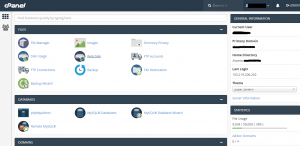
cPanel is the most popular control panel software these days. This type of application enables you to interact with your server and perform specific actions, such as creating backups, managing your databases, and so on. cPanel was designed for Linux-based systems, which happen to power the majority of the web.
It’s worth noting that cPanel doesn’t include customer management features – such as account creation – out of the box. For those, you’ll need to set up WHM alongside it. The good news is both platforms ship together regardless of which plan you choose.
Key Features :
- Linux-based hosting control panel
- Includes a broad range of features, including backup and database tools
- Enables users to set up most CMSs with simple installers
- Can power a hosting platform if used alongside WHM
Now, Let see about Plesk Panel :
At first glance, Plesk isn’t that different from cPanel. In fact, the thing that sets both control panels apart is that Plesk is available for both Windows and Linux. If you’re using a Windows-based server, the choice is basically made for you.
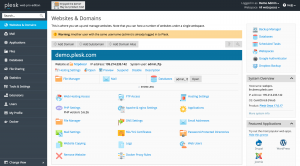
However, Plesk has more than just availability going for it. It features a very clean and modern interface that may remind you of the WordPress dashboard. All the key features you need to access can be reached from a sidebar and the rest of the screen adjusts depending on which one you pick.
Moving onto features, Plesk integrates both server and account management out of the box, which should make your life simpler. The platform also includes nearly every feature cPanel does, which makes choosing between both difficult. Don’t worry though, we’ll help you do that in a minute.
Key Features :
- Supports both Windows and Linux-based servers
- Includes both server and account management features out of the box
- Supports most popular CMSs and provides installers for them
Once you move on to more customizable plans like VPSs and dedicated servers, you’ll usually get your choice of hosting control panels.
Conclusion :
Your choice of web hosting control panel can have a large impact on the way you interact with your server. After all, it’s your panel that provides you with the features you need to manage your project. Even if you don’t have the option of choosing an alternative now, at some point you may need to know about the differences between cPanel and Plesk and when to use each.
cPanel is the most popular option these days, and it’s not without cause. After all, it’s easy to use, and it was created for Linux-based servers, which power the majority of the websites. On the other hand Plesk, is available for both Linux and Windows, which is great if you want to stick with a similar panel across multiple servers.
Hope this information helps you all, Now you have a clear idea about choosing the hosting control panels.