
In the ever-evolving landscape of the internet, website security is a paramount concern for businesses and individuals alike. Malware attacks pose a significant threat, compromising sensitive data, damaging reputation, and causing financial losses. This comprehensive guide aims to provide website owners with practical strategies to safeguard their websites against malware attacks.
What is Malware attacks
Malware, short for malicious software, refers to any software specifically designed to harm or exploit devices, networks, or data. Malware attacks are malicious actions carried out by deploying such software with the intent of causing damage, stealing information, or gaining unauthorized access to computer systems. Malware comes in various forms, each with its own specific malicious purposes.
Types of malware attacks
Malware attacks come in various forms, each with its own specific characteristics and purposes. Here are some common types of malware attacks:
- Viruses:
- Viruses are malicious programs that attach themselves to legitimate files and replicate when the infected file is executed. They can spread through email attachments, infected software, or compromised websites.
- Worms:
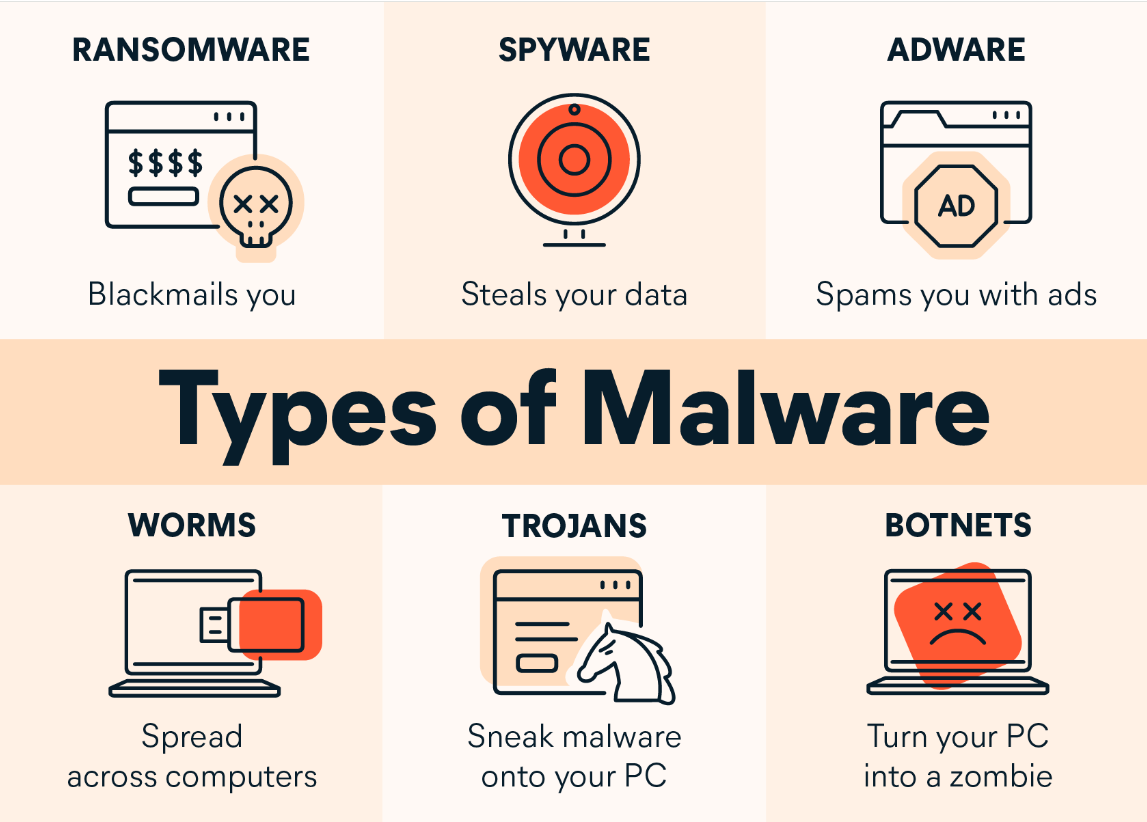
- Worms are self-replicating malware that spread across networks without needing a host file. They often exploit vulnerabilities in operating systems or network protocols to propagate and can cause widespread damage.
- Trojan Horses:
- Trojans masquerade as legitimate software but contain malicious code. Once installed, they can open a backdoor for attackers, steal sensitive information, or perform other malicious actions without the user’s knowledge.
- Ransomware:
- Ransomware encrypts files on a victim’s system, rendering them inaccessible. Attackers then demand a ransom, usually in cryptocurrency, in exchange for providing the decryption key. Notable examples include WannaCry and NotPetya.
- Spyware:
- Spyware is designed to spy on a user’s activities, capturing sensitive information such as keystrokes, login credentials, and browsing habits. It often operates silently in the background without the user’s knowledge.
- Adware:
- Adware displays unwanted advertisements on a user’s device. While not as malicious as other forms of malware, adware can be annoying and may lead to compromised system performance.
- Botnets:
- Botnets are networks of compromised computers controlled by a single entity, often used to carry out coordinated attacks, send spam, or perform other malicious activities without the owners’ knowledge.
Consequences of Malware Attacks
Malware attacks can have severe and wide-ranging consequences, impacting individuals, businesses, and even entire economies. Here are some common consequences of malware attacks:

- Data Breach:
- Malware attacks often lead to unauthorized access to sensitive data. This can result in a data breach where personal, financial, or confidential information is exposed. The consequences may include identity theft, financial losses, and reputational damage.
- Financial Losses:
- Many malware attacks are financially motivated. Ransomware, for example, can lead to direct financial losses if victims choose to pay the ransom. Additionally, the costs associated with recovering from an attack, such as restoring systems and implementing security measures, can be significant.
- Disruption of Services:
- Malware attacks can disrupt the normal functioning of systems and services. This can lead to downtime, affecting productivity, customer service, and business operations. In critical sectors such as healthcare or utilities, disruptions can have life-threatening consequences.
- Loss of Productivity:
- Malware attacks can lead to a loss of productivity as employees and IT teams work to contain the threat, investigate the incident, and implement remediation measures. This can result in downtime, affecting day-to-day operations.
- Loss of Customer Trust:
- Customers may lose trust in businesses that fail to protect their data. A single significant data breach can result in a loss of customer confidence that may take a considerable amount of time and effort to rebuild.
- Reputational Damage:
- A successful malware attack can severely damage an individual’s or organization’s reputation. Customers and stakeholders may lose trust if they perceive the entity as unable to protect sensitive information or provide secure services.
- Public Safety Concerns:
- In critical infrastructure sectors such as healthcare, energy, or transportation, malware attacks can pose significant public safety concerns. Disruptions to essential services can impact the well-being and safety of individuals.
Common Vulnerabilities Exploited by Malware
Malware often takes advantage of various vulnerabilities in software, systems, and human behavior. Understanding these common vulnerabilities is crucial for implementing effective cybersecurity measures. Here are some common vulnerabilities exploited by malware:
- Outdated Software and Unpatched Systems:
- Failure to update and patch software leaves systems vulnerable to known exploits. Malware often targets outdated software or systems that haven’t applied the latest security patches.
- Weak Passwords:
- Weak, easily guessable passwords provide a gateway for malware to gain unauthorized access. Brute-force attacks and password-guessing techniques are commonly used to exploit weak passwords.
- Unsecured Network Protocols:
- Malware can exploit vulnerabilities in network protocols to gain unauthorized access. It’s crucial to secure network communication with encryption and to disable unnecessary or insecure protocols.
- Phishing and Social Engineering:
- Malware often enters systems through user interactions, such as clicking on malicious links or opening infected email attachments. Phishing attacks leverage social engineering to deceive individuals into taking actions that compromise security.
- Insufficient User Permissions:
- Malware can take advantage of users with excessive or unnecessary permissions. Implementing the principle of least privilege helps mitigate the impact of malware by restricting user access to only what is essential for their roles.
- Insecure Web Applications:
- Malware may exploit vulnerabilities in web applications, such as SQL injection or cross-site scripting (XSS), to gain access to databases, compromise user data, or deliver malicious payloads.
- Unsecured File Uploads:
- Websites that allow file uploads without proper validation and scanning are susceptible to malware attacks. Malicious files can be uploaded and executed, leading to the compromise of the hosting server.
- Unsecured Internet of Things (IoT) Devices:
- Insecure IoT devices, such as cameras, routers, and smart appliances, can serve as entry points for malware attacks. Weak security on these devices may allow attackers to gain access to the broader network.
- Poorly Configured Firewalls and Security Settings:
- Malware can exploit weaknesses in firewalls or security configurations to infiltrate networks. Properly configuring firewalls and security settings helps prevent unauthorized access.
Best Practices for Website Security from malware attacks
Securing your website against malware attacks is crucial for protecting sensitive data, maintaining trust with users, and ensuring uninterrupted operations. Here are best practices for website security to help mitigate the risk of malware attacks:

- Regular Software Updates:
- Keep your website software, content management system (CMS), plugins, and any third-party applications up to date. Regularly apply security patches to address vulnerabilities that could be exploited by malware.
- Use Secure Hosting:
- Choose a reputable hosting provider that prioritizes security. Opt for hosting plans with features like firewalls, intrusion detection systems, and regular security audits. Consider using a web application firewall (WAF) to filter and monitor incoming traffic.
- SSL Encryption:
- Implement Secure Socket Layer (SSL) or Transport Layer Security (TLS) encryption to secure data transmitted between the user’s browser and your website. This helps protect sensitive information and improves your website’s trustworthiness.
- Strong Password Policies:
- Enforce strong password practices for all user accounts, including administrators, content editors, and contributors. Use complex passwords and consider implementing two-factor authentication (2FA) for an extra layer of security.
- Regular Backups:
- Schedule regular automated backups of your website, including databases and files. Store backups in a secure, separate location. In the event of a malware attack, having recent backups ensures you can quickly restore your site.
- Web Application Firewall (WAF):
- Deploy a WAF to protect your website from various online threats. WAFs can filter and monitor HTTP traffic, blocking malicious activity, and helping to prevent common attacks such as SQL injection and cross-site scripting.
- Malware Scanning and Monitoring:
- Use malware scanning tools to regularly check your website for malicious code or files. Implement real-time monitoring to detect any unusual activities, such as unauthorized access or unexpected file changes.
- File Upload Restrictions:
- Limit the types of files that users can upload to your website. Ensure that all uploaded files are scanned for malware before being processed or stored. Store uploaded files in a secure location outside the webroot.
- Remove Unused Plugins and Themes:
- Deactivate and remove any unnecessary plugins and themes from your website. Unused or outdated plugins can introduce vulnerabilities that attackers may exploit.
Conclusion
Securing your website against malware attacks requires a proactive and multifaceted approach. By staying vigilant, implementing best practices, and keeping up with the latest security developments, you can significantly reduce the risk of falling victim to malicious activities. Remember, investing in website security is an investment in the long-term success and trustworthiness of your online presence.